Geometry type validators
Next version — This documentation describes a major version that is not yet the current stable release of spatial-validator.
Geometry type validators check Points, curves, surfaces and collections against the rules for their declared geometry type.
This page covers ordinary type validity and explicit closure contracts, with valid examples and the violations produced by invalid values.
Optional simplicity validators have a dedicated page.
Use Spatial for automatic type dispatch, or select an explicit constraint for the contract your application requires.
Use this setup for the examples below; each prints the violation code and its default English message.
<?php

require 'vendor/autoload.php';

use LongitudeOne\SpatialTypes\Types\Dimension2\Geometry\Point;
use LongitudeOne\SpatialTypes\Types\Dimension2\Geometry\LineString;
use LongitudeOne\SpatialTypes\Types\Dimension2\Geometry\CircularString;
use LongitudeOne\SpatialTypes\Types\Dimension2\Geometry\CompoundCurve;
use LongitudeOne\SpatialTypes\Types\Dimension2\Geometry\Polygon;
use LongitudeOne\SpatialTypes\Types\Dimension2\Geometry\GeometryCollection;
use LongitudeOne\SpatialTypes\Types\Dimension2\Geometry\MultiPoint;
use LongitudeOne\SpatialTypes\Types\Dimension2\Geometry\MultiLineString;
use LongitudeOne\SpatialTypes\Types\Dimension2\Geometry\Triangle;
use LongitudeOne\SpatialTypes\Types\Dimension2\Geometry\MultiPolygon;
use LongitudeOne\SpatialTypes\Types\Dimension3z\Geometry\MultiPolygon as MultiPolygonZ;
use LongitudeOne\SpatialTypes\Types\Dimension3z\Geometry\PolyhedralSurface;
use LongitudeOne\SpatialTypes\Types\Dimension3z\Geometry\Polygon as PolygonZ;
use LongitudeOne\SpatialTypes\Types\Dimension2\Geography\Point as GeographyPoint;
use LongitudeOne\SpatialValidator\Validator\Constraints as SpatialAssert;
use Symfony\Component\Validator\Validation;

$validator = Validation::createValidator();
$showViolations = static function ($spatialObject, $constraint = null) use ($validator): void {
    $violations = $validator->validate($spatialObject, $constraint ?? new SpatialAssert\Spatial());
    foreach ($violations as $violation) {
        echo ($violation->getPropertyPath() ?: '[root]') . ' | '
            . $violation->getCode() . ': ' . $violation->getMessage() . PHP_EOL;
    }
};
Point and coordinate checks
The generic Spatial constraint applies three coordinate rules to Points, as listed in the
coordinate rules reference.
A valid Point
A Point represents one position. A non-empty Point is valid when every declared coordinate is present and finite; a Geography Point must also respect longitude and latitude bounds. An EMPTY Point has no coordinates and is also valid. Here (10, 20) is valid both as a Geometry position and as Geography longitude/latitude in degrees.
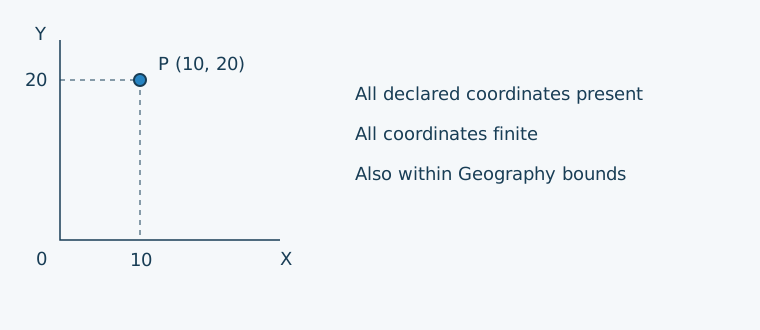
$spatialObject = new Point(10, 20);
$showViolations($spatialObject); // No violations.

$spatialObject = new GeographyPoint(10, 20);
$showViolations($spatialObject); // No violations.
Consistent coordinates and EMPTY state
CoordinateLayout checks that all declared ordinates are present, or all are absent for an EMPTY Point.
Here X is present but Y is missing. The subclass deliberately simulates malformed input, because the standard Point constructor rejects partially missing coordinates.
$spatialObject = new Point(10, null);

$showViolations($spatialObject);
[root] | coordinatelayout-invalid: The declared coordinate layout and EMPTY state must be consistent.
Finite coordinate values
FiniteCoordinates rejects infinity and NAN on every declared axis, including Z and M when present.
This demonstration Point reports positive infinity for X.
$spatialObject = new Point(INF, 20);

$showViolations($spatialObject);
[root] | finitecoordinates-invalid: The X ordinate must be finite.
Geography longitude and latitude bounds
GeographyBounds checks Geography Points: X (longitude) must be within [-180, 180] and Y (latitude) within [-90, 90], in degrees.
It does not apply these bounds to Geometry Points. This example reports both an out-of-range longitude and an out-of-range latitude.
$spatialObject = new GeographyPoint (10, 20);

$showViolations($spatialObject);
[root] | geographybounds-invalid: The X ordinate must be within [-180, 180] degrees.
[root] | geographybounds-invalid: The Y ordinate must be within [-90, 90] degrees.
LineString checks
For a LineString, Spatial validates its component Points and their metadata, then checks the minimum point count,
EMPTY members and consecutive duplicate positions. A line may be open or cross itself; simplicity requires an explicit constraint.
These examples follow the line rules reference
and reuse the setup above. Paths such as points[1] identify the second Point; [root] identifies the line itself.
A valid LineString
A LineString joins positions in order with straight segments. A non-empty valid line contains at least two valid non-EMPTY Points, with matching metadata and no consecutive duplicate positions. It need not be closed or simple; an EMPTY line is also valid. This open route A → B → C passes ordinary validity. See line simplicity for the optional check.
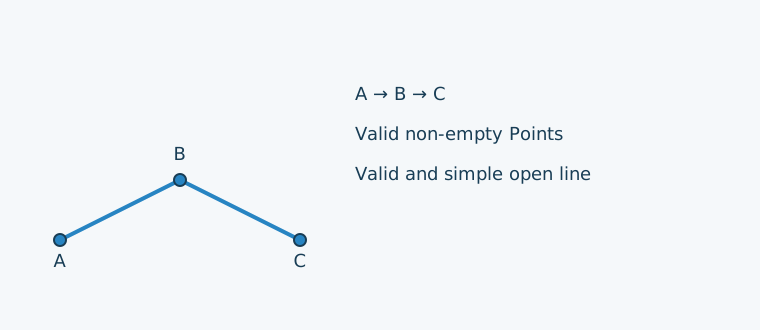
$spatialObject = new LineString([new Point(0, 0), new Point(2, 1), new Point(4, 0)]);
$showViolations($spatialObject); // No violations.
At least two Points
MinimumPointCount rejects a line containing only one Point. An empty point list is allowed as an EMPTY LineString.
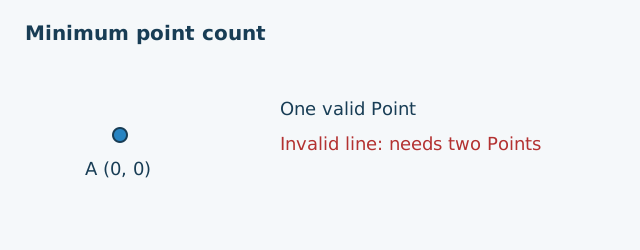
$spatialObject = new LineString([new Point(0, 0)]);
$showViolations($spatialObject);
[root] | minimumpointcount-invalid: A line must contain at least 2 points unless EMPTY is allowed.
No EMPTY Point members
A Point without coordinates is valid on its own, but cannot supply a position within a line. The same missing position also prevents consecutive-position comparison, so this example produces two violations. The dashed gap in the illustration is schematic: an EMPTY Point has no location to draw. The subclass simulates malformed input that the standard LineString constructor rejects.
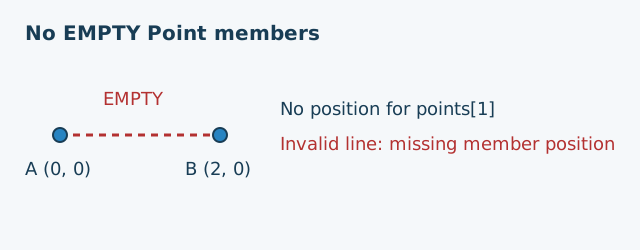
$spatialObject = new LineString([new Point(0, 0), new Point(), new Point(2, 0)]);

$showViolations($spatialObject);
points[1] | nonemptypoints-invalid: A line must not contain an EMPTY Point.
points[1] | noconsecutiveduplicatepoints-input: Finite, non-empty Point coordinates are required for comparison.
No consecutive duplicate positions
Two successive Points must have different spatial positions. Here the second and third Points both occupy B (2, 0). The demonstration switches to malformed coordinates after construction, because the standard constructor rejects consecutive duplicates.
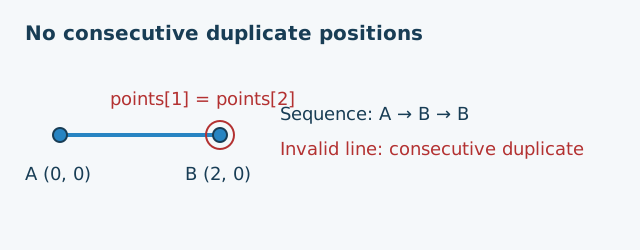
$spatialObject = new LineString ([new Point(0, 0), new Point(2, 0), new Point(2, 0)]);
$showViolations($spatialObject);
points[2] | noconsecutiveduplicatepoints-invalid: Consecutive points must have different spatial positions.
Linear-ring checks
A parcel boundary needs more than an ordinary valid line: it must return to its starting position and form a simple ring. The linear-ring rules provide two explicit constraints on LineString objects. The helper above accepts an optional constraint for these examples.
A valid linear ring
A linear ring is a closed, simple, non-empty LineString used as a boundary.
It needs at least four positions, including the repeated starting position, and must pass line and Point validation.
This triangular boundary A → B → C → A is valid under both closure and complete Ring checks.
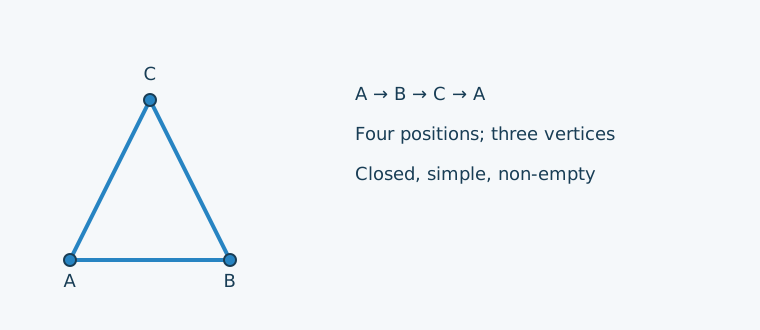
$spatialObject = new LineString([
    new Point(0, 0), new Point(2, 0), new Point(1, 2), new Point(0, 0),
]);
$showViolations($spatialObject, new SpatialAssert\FirstPointEqualsLastPoint()); // No violations.
$showViolations($spatialObject, new SpatialAssert\Ring()); // No violations.
Closure only: FirstPointEqualsLastPoint
FirstPointEqualsLastPoint checks that the first and last Points are finite, non-empty and at the same spatial position.
This open boundary A → B → C fails because it stops at C instead of returning to A.
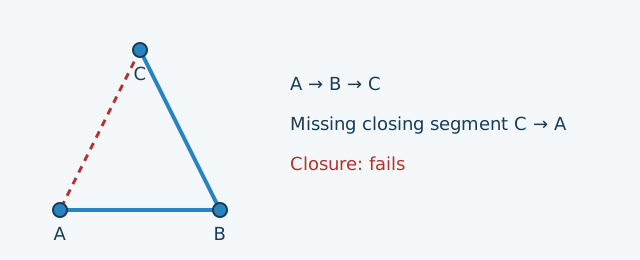
$spatialObject = new LineString([
    new Point(0, 0), new Point(2, 0), new Point(1, 2),
]);
$showViolations($spatialObject, new SpatialAssert\FirstPointEqualsLastPoint());
[root] | firstpointequalslastpoint-invalid: A closed line requires finite non-empty endpoints at the same position.
Appending A closes this boundary, producing the valid ring shown at the start of this section.
Closure alone does not check the whole line or establish ring validity.
It compares XY, or XYZ when Z exists, and ignores M. EMPTY fails because it has no endpoints.
For non-empty Geography with finite endpoints, the check reports firstpointequalslastpoint-unavailable
with the message Geography line closure is not implemented yet. and a default warning payload.
A complete linear boundary: Ring
Ring requires a non-empty, valid, closed and simple line with at least four positions, counting the repeated starting position.
The triangular ring at the start of this section satisfies these requirements.
A closed boundary can still cross itself. This bow-tie returns to A and contains five positions, but fails the simplicity rule composed by Ring.
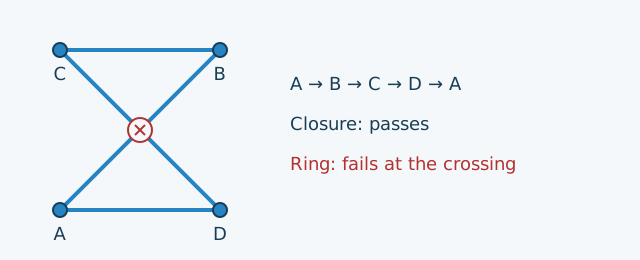
$spatialObject = new LineString([
    new Point(0, 0), new Point(2, 2), new Point(0, 2), new Point(2, 0), new Point(0, 0),
]);
$showViolations($spatialObject, new SpatialAssert\FirstPointEqualsLastPoint()); // No violations.
$showViolations($spatialObject, new SpatialAssert\Ring());
[root] | simplelinestring-invalid: The line has a forbidden segment intersection or overlap.
An EMPTY LineString fails Ring with ring-empty: An EMPTY LineString is not a linear ring.
On Geography, available structural and Point checks still run, but closure and simplicity produce separate unavailable-check warnings.
Use these constraints explicitly for a standalone LineString: generic Spatial does not require every line to be a closed ring.
Circular-curve checks
A CircularString describes arcs using successive groups of three defining Points, with neighbouring arcs sharing an endpoint.
Spatial selects CircularString validation, which checks components, Point coordinates and the two structural rules below.
Optional circular-curve simplicity is covered separately.
These examples follow the circular-curve rules
and reuse the setup above. The small subclasses simulate malformed input that the standard constructor rejects.
Three valid CircularStrings with different properties
A non-empty CircularString is valid when it has an odd number of at least three valid non-EMPTY defining Points with matching metadata, and each arc's intermediate position differs from both endpoints. EMPTY is also valid. The three examples below all satisfy ordinary validity: an open semicircle, the same semicircle retraced in reverse, and a full circle. They differ in simplicity and closure. Being closed does not make a curve simple; retracing an arc does not fail ordinary CircularString validity.
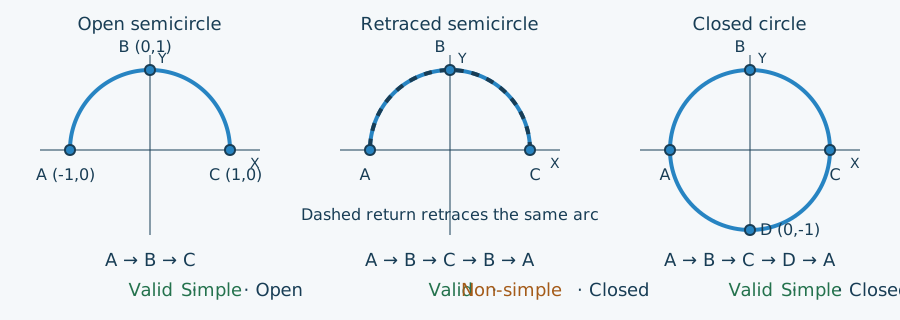
$open = new CircularString([[-1, 0], [0, 1], [1, 0]]);
$retraced = new CircularString([[-1, 0], [0, 1], [1, 0], [0, 1], [-1, 0]]);
$circle = new CircularString([[-1, 0], [0, 1], [1, 0], [0, -1], [-1, 0]]);

foreach (['Open semicircle' => $open, 'Retraced semicircle' => $retraced, 'Closed circle' => $circle] as $label => $spatialObject) {
    $violations = $validator->validate($spatialObject, new SpatialAssert\Spatial());
    echo $label . ': ' . count($violations) . PHP_EOL;
}
Open semicircle: 0
Retraced semicircle: 0
Closed circle: 0
Apply SimpleCircularString explicitly when your application also requires simplicity. A circular ring must be non-empty, simple and closed; its defining-point count differs from the four-position minimum for a linear ring.
An odd number of at least three Points
CircularPointCount accepts EMPTY or an odd number of at least three defining Points: 3, 5, 7, and so on.
Two endpoints alone do not define the intended arc; a third Point on the arc is needed.
The dashed arc below shows one possible completion, not a curve determined by the two Points.
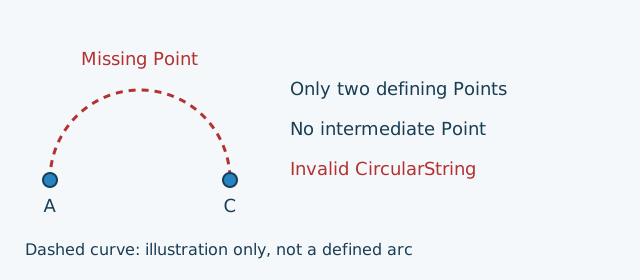
$spatialObject = new class ([new Point(-1, 0), new Point(0, 1), new Point(1, 0)]) extends CircularString {
    public function getPoints(): array
    {
        return [new Point(-1, 0), new Point(1, 0)];
    }
};
$showViolations($spatialObject);
[root] | circularpointcount-invalid: A non-empty CircularString needs an odd number of at least three points.
Valid defining Points: CircularArcPoints
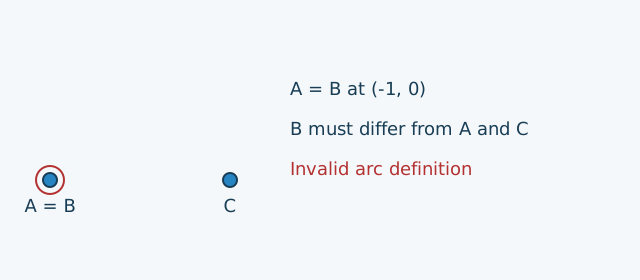
CircularArcPoints requires each Point to be non-empty, and the intermediate position of each arc to differ from both endpoints.
Here A and B occupy the same position, so the first arc cannot be defined correctly.
The violation path arcs[0] identifies that first arc.
$spatialObject = new class ([new Point(-1, 0), new Point(0, 1), new Point(1, 0)]) extends CircularString {
    public function getPoints(): array
    {
        return [new Point(-1, 0), new Point(-1, 0), new Point(1, 0)];
    }
};
$showViolations($spatialObject);
arcs[0] | circulararcpoints-invalid: The intermediate arc position must differ from both endpoints.
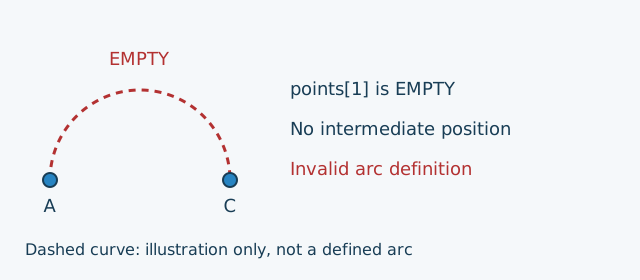
An EMPTY intermediate Point also fails this constraint, this time at points[1].
It has no position to draw; the gap below is schematic.
$spatialObject = new class ([new Point(-1, 0), new Point(0, 1), new Point(1, 0)]) extends CircularString {
    public function getPoints(): array
    {
        return [new Point(-1, 0), new Point(), new Point(1, 0)];
    }
};
$showViolations($spatialObject);
points[1] | circulararcpoints-invalid: A circular arc must not contain an EMPTY Point.
The two endpoints may coincide: A → B → A can define a full circle when B is distinct from A. This differs from an intermediate Point coinciding with an endpoint; the four-position minimum for linear rings does not apply to circular arcs.
Collinear defining Points represent the segment between the endpoints, rather than two chords. Geometry defining-position checks use XYZ when Z exists and otherwise XY; M must remain finite but is ignored spatially.
Compound-curve checks
A CompoundCurve joins LineString and CircularString components in order, for example a curved road followed by a straight section.
Spatial selects CompoundCurve validation: it checks each component and its metadata, rejects EMPTY members and verifies consecutive joins.
Optional whole-curve simplicity is covered separately.
These examples follow the compound-curve rules
and reuse the setup above.
Connected components: CompoundCurve
A valid non-empty CompoundCurve is an ordered chain of valid non-EMPTY line or circular components with matching metadata and consecutive endpoints. It may be open; simplicity is checked separately. This road follows an upper semicircle from A (-1, 0) through B (0, 1) to C (1, 0), then a straight section to D (2, 0). Both components meet at C, so the compound curve is valid.
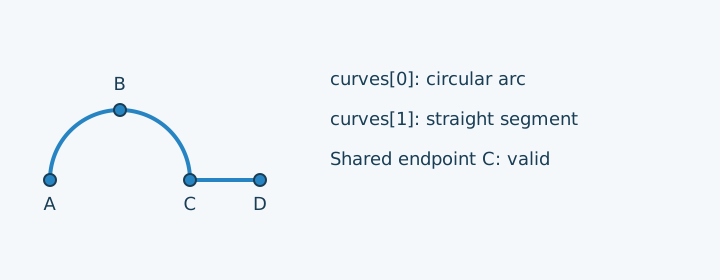
$spatialObject = new CompoundCurve([
    new CircularString([new Point(-1, 0), new Point(0, 1), new Point(1, 0)]),
    new LineString([new Point(1, 0), new Point(2, 0)]),
]);
$showViolations($spatialObject); // No violations.
If the straight section starts at (2, 0) instead, there is a gap after C (1, 0). The following subclass simulates disconnected components, which the standard constructor rejects.
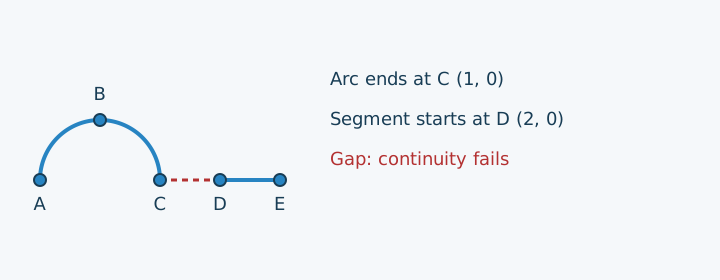
$spatialObject = new class ([new LineString([new Point(0, 0), new Point(1, 0)])]) extends CompoundCurve {
    public function getCurves(): array
    {
        return [
            new CircularString([new Point(-1, 0), new Point(0, 1), new Point(1, 0)]),
            new LineString([new Point(2, 0), new Point(3, 0)]),
        ];
    }
};
$showViolations($spatialObject);
curves[1] | compoundcurve-disconnected: The component must start at the preceding component endpoint.
Each component must be a valid LineString or CircularString with matching Geometry/Geography family, exact coordinate variant and full spatial reference. Component validation runs before join checks. No component is reordered and no coordinates are moved to fill gaps.
No EMPTY contributing component
An EMPTY LineString is valid on its own, but it cannot contribute a section to a compound curve. Here the subclass simulates an EMPTY second component, which the standard constructor rejects. The EMPTY component has no location; the box below is a schematic list entry, not a drawn segment.
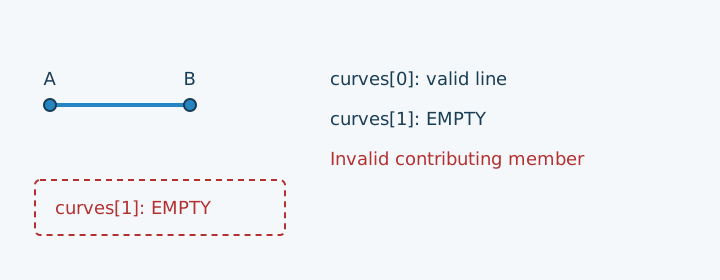
$spatialObject = new class ([new LineString([new Point(0, 0), new Point(1, 0)])]) extends CompoundCurve {
    public function getCurves(): array
    {
        return [
            new LineString([new Point(0, 0), new Point(1, 0)]),
            new LineString([]),
        ];
    }
};
$showViolations($spatialObject);
curves[1] | compoundcurve-empty-member: A contributing curve must not be EMPTY.
This differs from a compound curve with no components: new CompoundCurve([]) is valid EMPTY and also passes simplicity.
Geometry joins compare XYZ when Z exists and otherwise XY, ignoring M.
For non-empty Geography, component and Point checks still run, but joins report compoundcurve-unavailable
with Geography compound-curve continuity is unavailable. and a default warning payload.
Polygon structure and supporting plane
A Polygon needs consistent boundary data and a plane that contains every boundary position.
The internal Polygon structure and supporting-plane checks
validate each boundary as a Ring, check matching component metadata and establish a common supporting plane.
rings[0] is the exterior boundary; later rings are holes.
Use public Spatial or Polygon validation: PolygonStructure is an internal building block, not a separate public validation API.
The examples below reuse the setup above.
A valid plane can be vertical
A valid non-empty Polygon has a simple closed exterior and valid interior rings, all with matching metadata in one non-degenerate plane. Its holes and boundary contacts must also satisfy the topology rules presented below. Planarity does not require a horizontal surface. This rectangle lies entirely in the vertical plane X = 0. Its exterior is closed, simple and contains non-collinear positions, so it passes validation. The illustration is an oblique projection of the XYZ coordinates, not a map view.
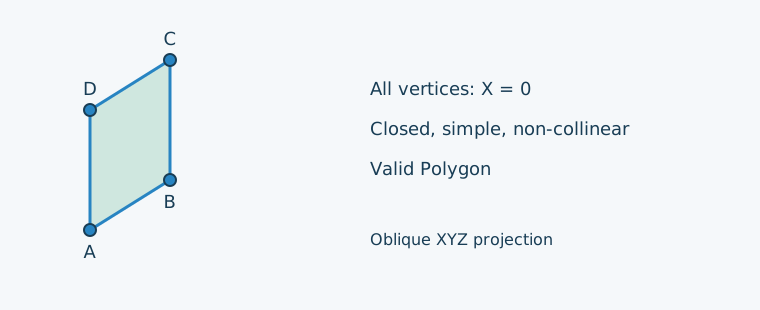
$spatialObject = new PolygonZ([
    [[0, 0, 0], [0, 2, 0], [0, 2, 2], [0, 0, 2], [0, 0, 0]],
]);
$showViolations($spatialObject); // No violations.
Consistent EMPTY state and exterior boundary
A genuine EMPTY Polygon has no rings and passes validation. A Polygon claiming to be non-empty must have an exterior boundary. This subclass deliberately reports a non-empty state while storing no rings. The dashed box below represents missing data, not a boundary present in the object.
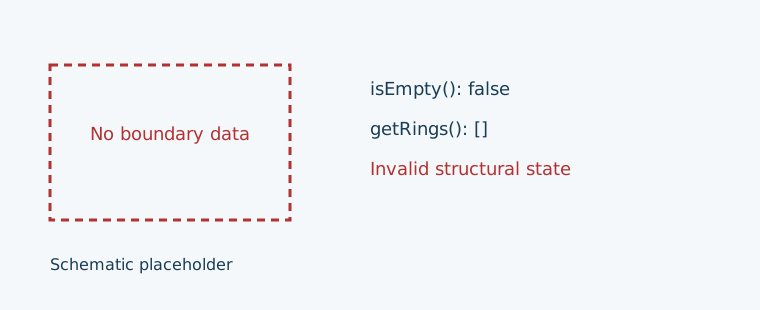
$spatialObject = new class ([]) extends Polygon {
    public function isEmpty(): bool
    {
        return false;
    }
};
$showViolations($spatialObject);
[root] | polygonstructure-empty: A non-empty Polygon requires an exterior ring.
Conversely, an object reporting EMPTY while retaining rings produces
polygonstructure-empty: An EMPTY Polygon must not contain boundary rings. Its stored boundaries are still checked.
An EMPTY boundary is rejected by Ring, even though a Polygon with no rings can be valid EMPTY.
Non-collinear exterior positions
Three positions on one straight line cannot establish a non-degenerate supporting plane. This candidate visits A (0, 0), B (1, 0), C (2, 0) and returns to A. It also retraces its segments, so both the Ring simplicity check and the supporting-plane check report violations. The subclass simulates a degenerate boundary without relying on the Polygon constructor to accept it.
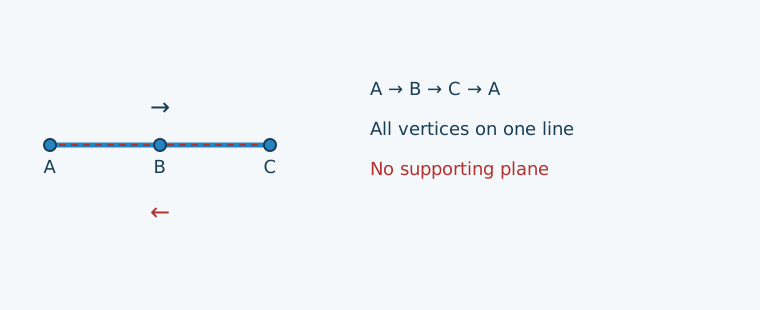
$spatialObject = new class ([]) extends Polygon {
    public function isEmpty(): bool
    {
        return false;
    }

    public function getRings(): array
    {
        return [new LineString([new Point(0, 0), new Point(1, 0), new Point(2, 0), new Point(0, 0)])];
    }
};
$showViolations($spatialObject);
rings[0] | simplelinestring-invalid: The line has a forbidden segment intersection or overlap.
rings[0] | polygonstructure-degenerate: The exterior must determine a non-degenerate supporting plane.
Every boundary position must share the same plane
Here A (0, 0, 0), B (2, 0, 0) and C (2, 2, 0) establish Z = 0, but D (0, 2, 1) lies above that plane. The ring is closed and simple in XYZ, yet the four vertices cannot bound a planar Polygon. The dashed guide shows D's projection onto Z = 0; that projected position is not part of the supplied ring.
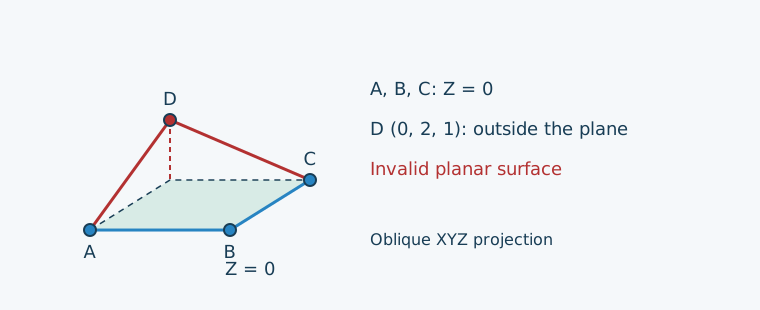
$spatialObject = new PolygonZ([
    [[0, 0, 0], [2, 0, 0], [2, 2, 0], [0, 2, 1], [0, 0, 0]],
]);
$showViolations($spatialObject);
rings[0].points[3] | polygonstructure-plane: Every boundary position must lie in the exterior supporting plane.
All exterior and hole positions must lie in that same plane. XYZ and XYZM use XYZ, including inclined and vertical planes; XY and XYM use XY. M must remain finite but does not determine the plane. The checks do not move coordinates or flatten the surface. Incompatible metadata or unusable positions suppress dependent plane checks while independent boundary diagnostics continue.
These checks are only one stage of complete Polygon validation: a coplanar hole outside the exterior still fails the later topology checks.
For non-empty Geography, Cartesian planarity is not used as a substitute. The internal stage reports polygonstructure-unavailable
with Geography Polygon planarity and inter-ring topology are not implemented yet., alongside boundary limitations and the public Polygon topology warning.
Unavailable-check warnings default to payload ['severity' => 'warning']; genuine EMPTY Geography needs no supporting plane.
Collection checks
Collections validate their members recursively. GeometryCollection accepts different spatial types, MultiPoint contains Points,
and MultiLineString contains LineStrings. Generic Spatial selects the corresponding validator.
Closure uses the explicit ClosedMultiLineString constraint. Optional collection simplicity is covered separately.
These examples follow the collection rules
and reuse the setup above. All member indexes are zero-based.
Mixed spatial types: GeometryCollection
A GeometryCollection groups spatial objects. It is valid when each member passes its own validation and matches the collection metadata; valid EMPTY members are retained. A collection can contain a survey marker, a route and a parcel boundary together. Their different types and topological dimensions are allowed; their Geometry/Geography family, coordinate variant and full spatial reference must match. General collection validity does not prohibit intersections between members or add a whole-collection simplicity check.
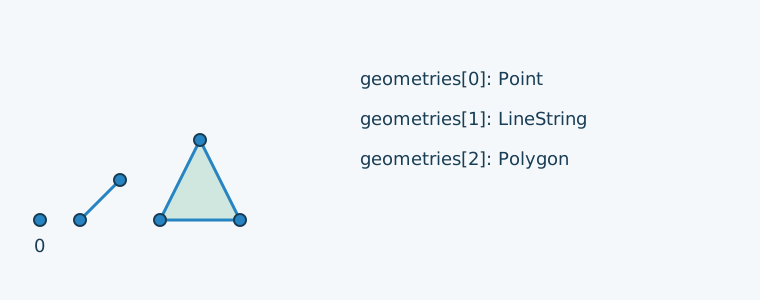
$spatialObject = new GeometryCollection(elements: [
    new Point(0, 0),
    new LineString([new Point(1, 0), new Point(2, 1)]),
    new Polygon([[[3, 0], [5, 0], [4, 2], [3, 0]]]),
]);
$showViolations($spatialObject); // No violations.
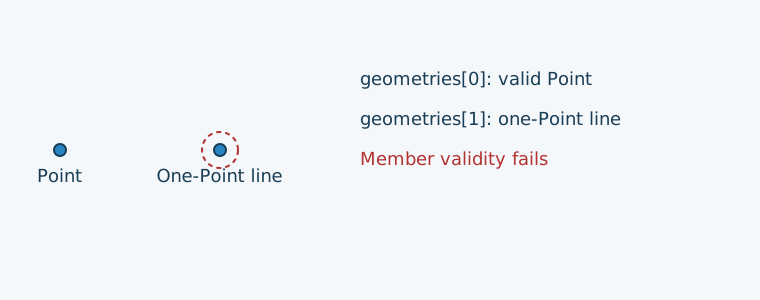
Each member still has to pass its own checks. Here the second member is a LineString containing only one Point.
The member's violation is preserved at geometries[1], rather than replaced by a generic collection error.
$spatialObject = new GeometryCollection(elements: [
    new Point(0, 0),
    new LineString([new Point(2, 0)]),
]);
$showViolations($spatialObject);
geometries[1] | minimumpointcount-invalid: A line must contain at least 2 points unless EMPTY is allowed.
Point collections: MultiPoint
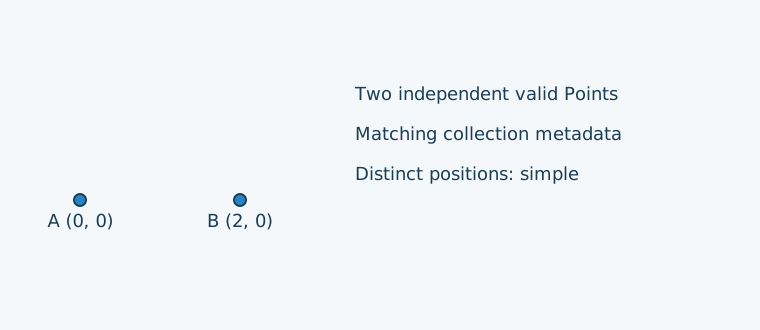
A MultiPoint groups independent Points. It is valid when its members are valid and their metadata match the collection; valid EMPTY members are allowed. The Points in this example have distinct positions.
$spatialObject = new MultiPoint([new Point(0, 0), new Point(2, 0)]);
$showViolations($spatialObject); // No violations.
Line collections: MultiLineString
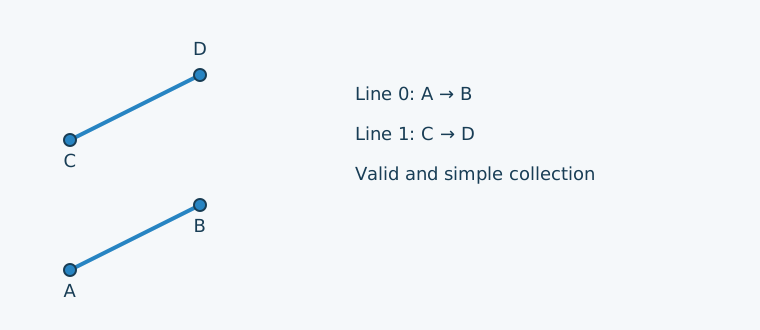
A MultiLineString groups LineStrings. It is valid when every member is valid and its metadata match the collection; valid EMPTY members are allowed. These two separate routes form a valid collection.
$spatialObject = new MultiLineString([
    new LineString([new Point(0, 0), new Point(2, 1)]),
    new LineString([new Point(0, 2), new Point(2, 3)]),
]);
$showViolations($spatialObject); // No violations.
Every member closed: ClosedMultiLineString
ClosedMultiLineString requires a non-EMPTY aggregate in which every member returns to its own starting position.
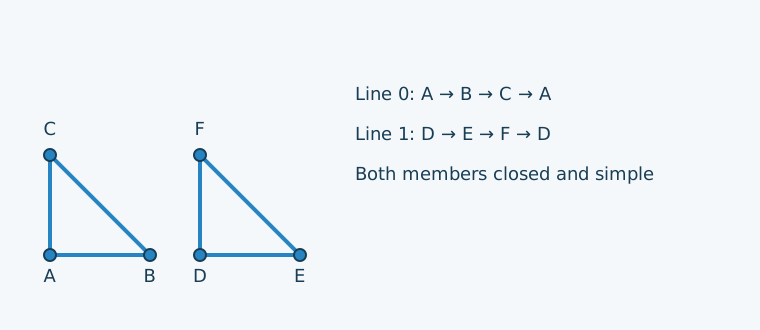
These two separate triangular loops satisfy that requirement: each member is individually closed and valid.
The two loops are disjoint; simplicity is a separate optional property.
$spatialObject = new MultiLineString([
    new LineString([new Point(0, 0), new Point(2, 0), new Point(0, 2), new Point(0, 0)]),
    new LineString([new Point(3, 0), new Point(5, 0), new Point(3, 2), new Point(3, 0)]),
]);
$showViolations($spatialObject); // No violations.
$showViolations($spatialObject, new SpatialAssert\ClosedMultiLineString()); // No violations.
Joining several open lines into a loop is insufficient. Here A → B → C and C → D → A together draw a square, but neither of the two members is closed.
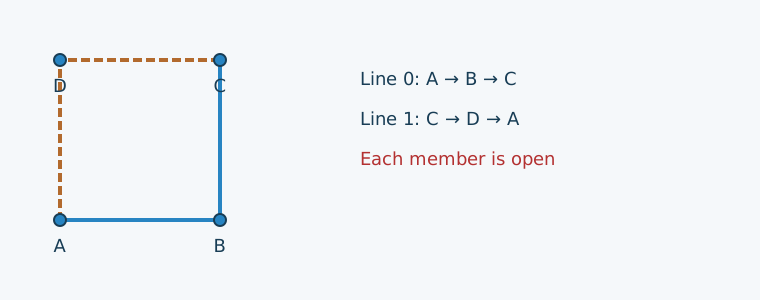
$spatialObject = new MultiLineString([
    new LineString([new Point(0, 0), new Point(2, 0), new Point(2, 2)]),
    new LineString([new Point(2, 2), new Point(0, 2), new Point(0, 0)]),
]);
$showViolations($spatialObject); // No violations.
$showViolations($spatialObject, new SpatialAssert\ClosedMultiLineString());
lineStrings[0] | firstpointequalslastpoint-invalid: A closed line requires finite non-empty endpoints at the same position.
lineStrings[1] | firstpointequalslastpoint-invalid: A closed line requires finite non-empty endpoints at the same position.
Closure does not establish simplicity: individually closed members may still intersect or cross themselves.
EMPTY members and unavailable checks
Valid EMPTY members are retained in GeometryCollection, MultiPoint and MultiLineString and still checked for matching metadata. A collection represents EMPTY if it has no members or all members represent the empty set; this flag never hides stored members. These rules do not permit EMPTY Points inside a LineString.
An EMPTY MultiLineString fails explicit closure with
[root] | closedmultilinestring-invalid: An EMPTY MultiLineString is not closed.
In a mixed non-empty aggregate, each EMPTY line instead fails its own endpoint-closure check at lineStrings[index].
Member closure on non-empty Geography uses firstpointequalslastpoint-unavailable with Geography line closure is not implemented yet.
Warnings default to payload ['severity' => 'warning']; ordinary collection errors default to null.
Polygon topology and orientation
After checking structure, boundary rings and their common plane, Polygon checks how the boundaries relate to one another.
Generic Spatial performs the same validation. The examples below follow the
Polygon rules.
They model a parcel with exterior boundary rings[0] and excluded areas represented by holes at rings[1], rings[2], and so on.
They reuse the setup above and this square exterior:
$exterior = [[0, 0], [12, 0], [12, 12], [0, 12], [0, 0]];
A hole inside the parcel
A hole strictly inside the exterior is valid. Several holes are allowed when they remain mutually outside one another. Here a small square hole lies entirely inside the parcel. Its order is reversed relative to the exterior to avoid an orientation warning.
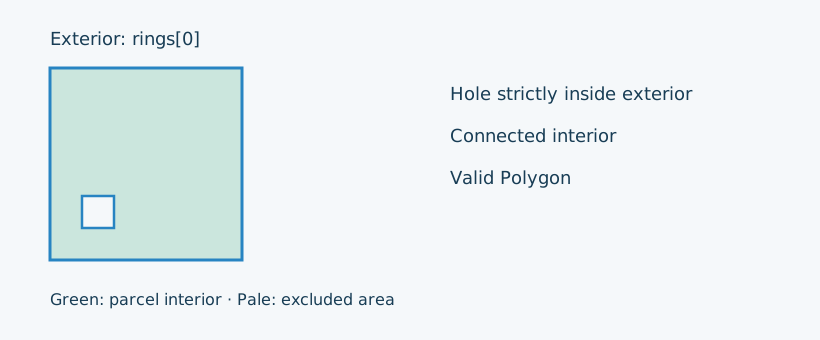
$hole = array_reverse([[2, 2], [4, 2], [4, 4], [2, 4], [2, 2]]);
$spatialObject = new Polygon([$exterior, $hole]);
$showViolations($spatialObject); // No violations.
An isolated tangent contact can be valid
A hole may touch the exterior at an isolated point if the parcel interior stays connected. This triangular hole touches the left boundary at (0, 6), without crossing it or sharing a boundary segment.
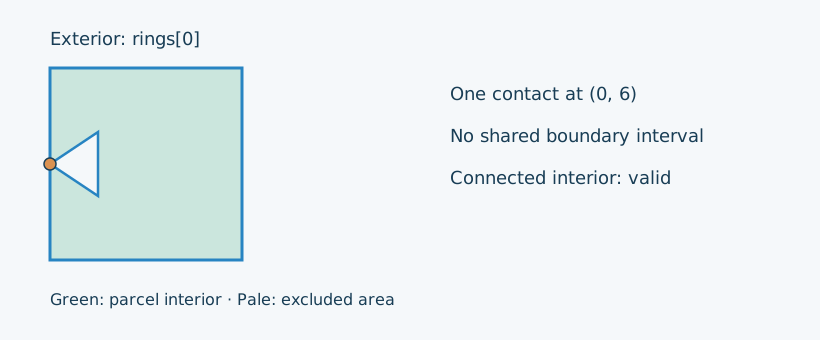
$hole = array_reverse([[0, 6], [3, 4], [3, 8], [0, 6]]);
$spatialObject = new Polygon([$exterior, $hole]);
$showViolations($spatialObject); // No violations.
A hole outside the exterior
An excluded area outside the parcel cannot be one of its holes. This triangle is completely outside the exterior, even though each ring is individually valid and coplanar.
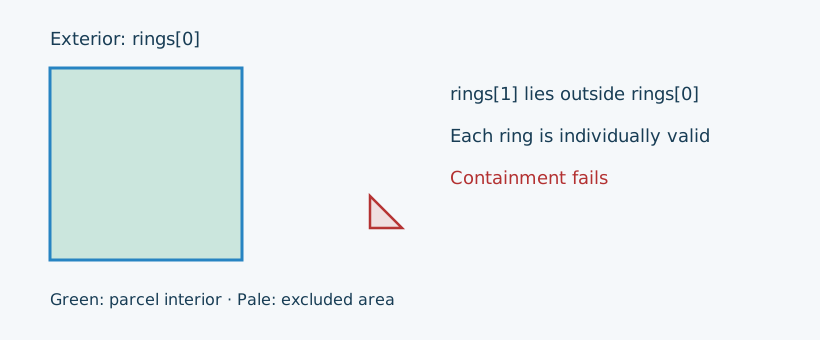
$hole = array_reverse([[20, 2], [22, 2], [20, 4], [20, 2]]);
$spatialObject = new Polygon([$exterior, $hole]);
$showViolations($spatialObject);
rings[1] | polygon-outside: Every hole must lie inside the exterior boundary.
A hole surrounding the entire exterior also fails containment; a larger area does not make it an interior hole.
Crossing boundaries or shared boundary intervals
A hole must not cross the exterior or share an interval of its boundary. This rectangular hole crosses the parcel's right edge at (12, 4) and (12, 8). The same intersection rule also rejects crossings and shared intervals between holes.
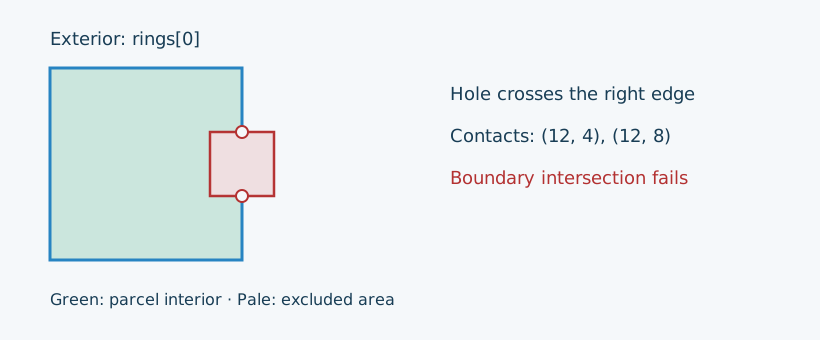
$hole = array_reverse([[10, 4], [14, 4], [14, 8], [10, 8], [10, 4]]);
$spatialObject = new Polygon([$exterior, $hole]);
$showViolations($spatialObject);
rings[1] | polygon-intersection: Polygon boundaries must not cross or share an interval.
Nested holes
One hole cannot contain another hole. The smaller hole below lies inside the larger excluded area rather than in the parcel interior. To represent an island inside an excluded area, use a separate surface in an appropriate multi-surface model.
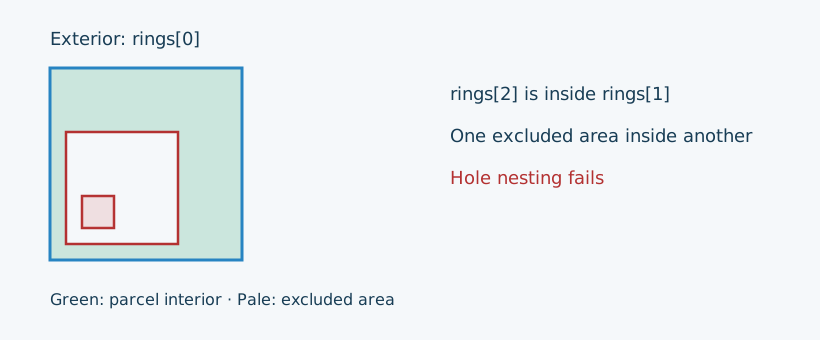
$largeHole = array_reverse([[1, 1], [8, 1], [8, 8], [1, 8], [1, 1]]);
$smallHole = array_reverse([[2, 2], [4, 2], [4, 4], [2, 4], [2, 2]]);
$spatialObject = new Polygon([$exterior, $largeHole, $smallHole]);
$showViolations($spatialObject);
rings[2] | polygon-nested: Polygon holes must not overlap or contain another hole.
Overlapping holes are also invalid; crossings or shared intervals can additionally produce intersection diagnostics.
A connected parcel interior
Isolated contacts must not combine to split the parcel interior. This diamond-shaped hole touches the left and right exterior boundaries, separating the remaining parcel into an upper and a lower region. The boundaries do not cross, but the interior is disconnected.
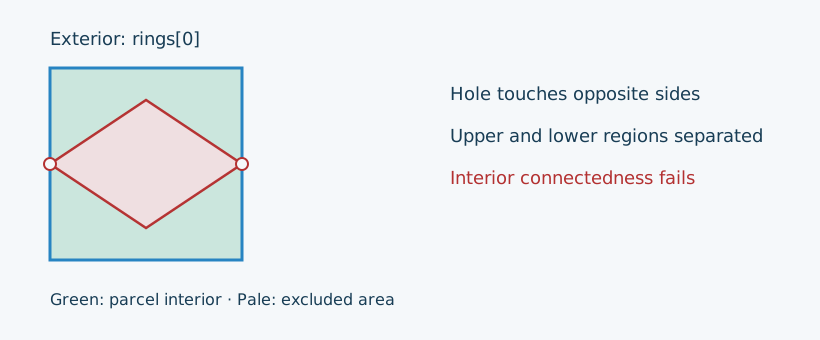
$hole = array_reverse([[0, 6], [6, 2], [12, 6], [6, 10], [0, 6]]);
$spatialObject = new Polygon([$exterior, $hole]);
$showViolations($spatialObject);
rings[1] | polygon-disconnected: Boundary contacts must not disconnect the Polygon interior.
Chains of touching holes and contact cycles enclosing an island can also disconnect the interior. Several boundaries meeting at one isolated point do not automatically make a Polygon invalid: the resulting interior matters.
Relative orientation: a warning
This hole is properly inside the parcel, but follows the same direction as the exterior. The validator emits an orientation warning, rather than a topology error. Orientation is relative: there is no universal clockwise-exterior requirement.
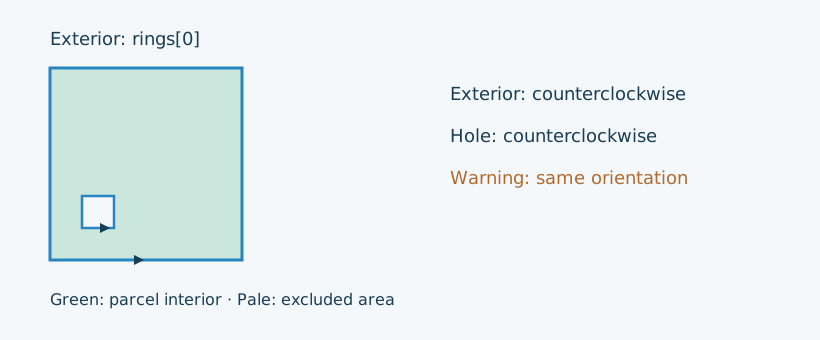
$hole = [[2, 2], [4, 2], [4, 4], [2, 4], [2, 2]];
$spatialObject = new Polygon([$exterior, $hole]);
$showViolations($spatialObject);

$violations = $validator->validate($spatialObject, new SpatialAssert\Polygon());
foreach ($violations as $violation) {
    echo 'severity: ' . $violation->getConstraint()->payload['severity'] . PHP_EOL;
}
rings[1] | polygon-orientation: A hole has the same orientation as the exterior boundary.
severity: warning
Reversing the hole removes this warning. Reversing every ring preserves their relative orientation and therefore the result. An orientation warning does not hide an independent topology error, such as an outside hole.
Scope and unavailable Geography checks
Genuine EMPTY Polygon is valid. A Triangle remains a distinct declared type; a triangular outline does not change a Polygon's declared type. Invalid structure prevents dependent topology calculations while preserving the original nested diagnostics. For Geometry XYZ/XYZM, topology uses the actual supporting plane, including inclined and vertical planes; M never participates spatially. The validator neither moves coordinates nor repairs or reorients rings.
On non-empty Geography, available structural and Point checks continue, but topology and orientation report
[root] | polygon-unavailable: Geography Polygon topology and orientation are not implemented yet., alongside the internal and boundary warnings.
The default payload for polygon-orientation and polygon-unavailable is ['severity' => 'warning'];
other Polygon topology errors default to null. An explicitly supplied Polygon payload is preserved.
Triangle checks
A Triangle is a declared spatial type, not just a Polygon with a triangular outline.
Spatial selects Triangle validation for Triangle objects, composing boundary, Point, metadata and supporting-plane checks.
The Triangle rules
require exactly four exterior positions A → B → C → A, three distinct non-collinear vertices and no holes.
The following examples reuse the setup above.
Three vertices and a closing position
This triangular parcel has three distinct vertices and repeats A to close its boundary.
A plain Polygon with the same coordinates remains a Polygon; applying the specialized Triangle constraint to it produces a type violation.
Generic validation does not infer a different type from the outline.
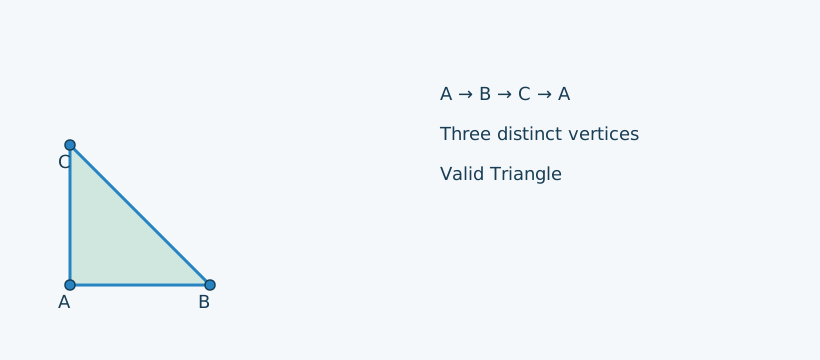
$spatialObject = new Triangle([[[0, 0], [4, 0], [0, 4], [0, 0]]]);
$showViolations($spatialObject); // No violations.
A fourth distinct vertex is not a Triangle
The square below is a valid Polygon boundary, but cannot be the exterior of a Triangle. This subclass simulates malformed Triangle data that the standard constructor rejects.
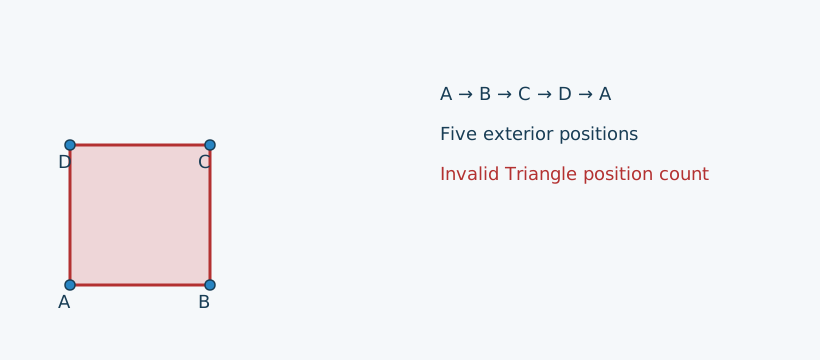
$spatialObject = new class ([]) extends Triangle {
    public function isEmpty(): bool
    {
        return false;
    }

    public function getRings(): array
    {
        return [new LineString([new Point(0, 0), new Point(4, 0), new Point(4, 4), new Point(0, 4), new Point(0, 0)])];
    }
};
$showViolations($spatialObject);
rings[0] | triangle-position-count: A non-empty Triangle requires exactly four exterior positions.
No interior rings
A Triangle cannot contain a hole, even when the hole is strictly inside its exterior. This second subclass simulates that invalid structure.
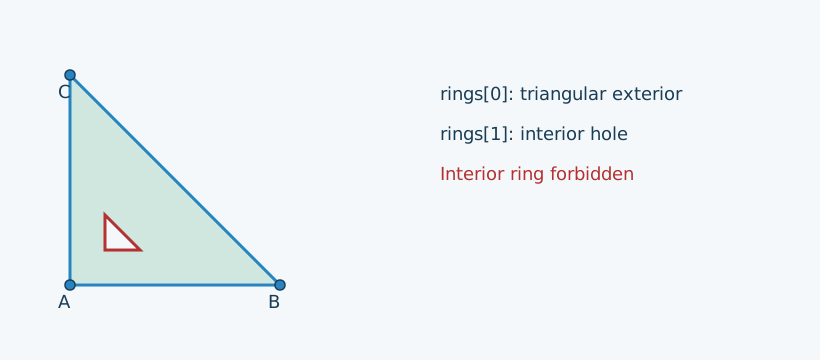
$spatialObject = new class ([]) extends Triangle {
    public function isEmpty(): bool
    {
        return false;
    }

    public function getRings(): array
    {
        return [
            new LineString([new Point(0, 0), new Point(6, 0), new Point(0, 6), new Point(0, 0)]),
            new LineString([new Point(1, 1), new Point(1, 2), new Point(2, 1), new Point(1, 1)]),
        ];
    }
};
$showViolations($spatialObject);
rings[1] | triangle-interior: A Triangle must not have interior rings.
Repeated vertices produce triangle-distinct at rings[0].points[index] with
A Triangle requires three distinct spatial vertices. Boundary and plane failures retain their shared codes,
including polygonstructure-degenerate for collinearity; Triangle boundary topology uses triangle-topology at rings[0].
Non-collinearity is determined from the first three vertices, so the closing position cannot supply a missing plane.
Genuine EMPTY Triangle is valid. XYZ/XYZM use the actual spatial plane; M must be finite but does not affect spatial predicates.
Non-empty Geography retains available checks and unavailable-geodetic warnings rather than establishing complete geographic validity.
MultiPolygon checks
A MultiPolygon represents several filled surfaces. Each member receives complete Polygon or Triangle validation, then the aggregate checks relationships between valid non-empty members. The MultiPolygon rules allow isolated contacts but reject overlapping interiors and shared boundary intervals. Member family, coordinate variant and full spatial reference must match, including for retained EMPTY members.
An isolated corner contact is valid
A valid MultiPolygon has valid members whose filled interiors do not intersect and whose contacts are isolated. Two parcels may meet at a single corner without sharing an edge or overlapping their interiors. The squares below touch only at (2, 2).
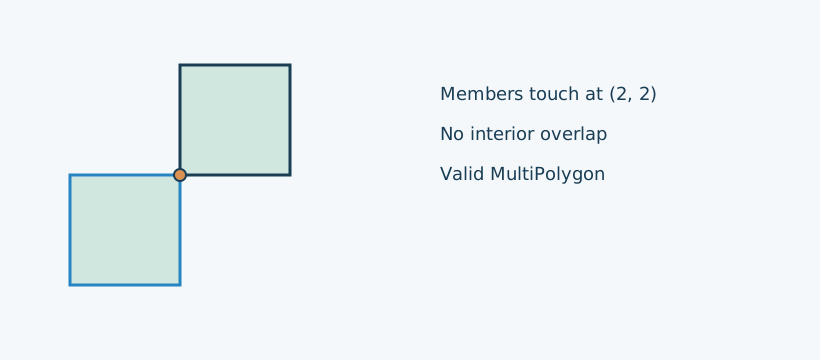
$spatialObject = new MultiPolygon([
    new Polygon([[[0, 0], [2, 0], [2, 2], [0, 2], [0, 0]]]),
    new Polygon([[[2, 2], [4, 2], [4, 4], [2, 4], [2, 2]]]),
]);
$showViolations($spatialObject); // No violations.
Overlapping interiors
These individually valid squares overlap on the area from (1, 1) to (2, 2).
The aggregate diagnostic identifies the later member, polygons[1], and names both member indexes in its message.
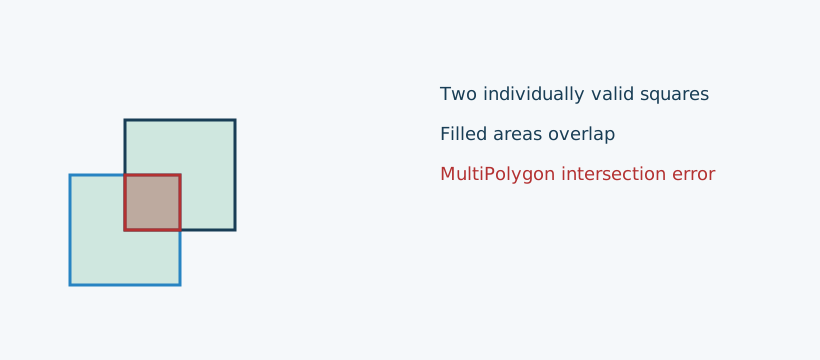
$spatialObject = new MultiPolygon([
    new Polygon([[[0, 0], [2, 0], [2, 2], [0, 2], [0, 0]]]),
    new Polygon([[[1, 1], [3, 1], [3, 3], [1, 3], [1, 1]]]),
]);
$showViolations($spatialObject);
polygons[1] | multipolygon-intersection: Polygon members 0 and 1 must have disjoint interiors and only isolated boundary contacts.
A shared edge also fails
Even without interior overlap, sharing the whole edge from (2, 0) to (2, 2) violates the isolated-contact rule. This differs from adjacent patches of a PolyhedralSurface, where shared edges connect the surface.
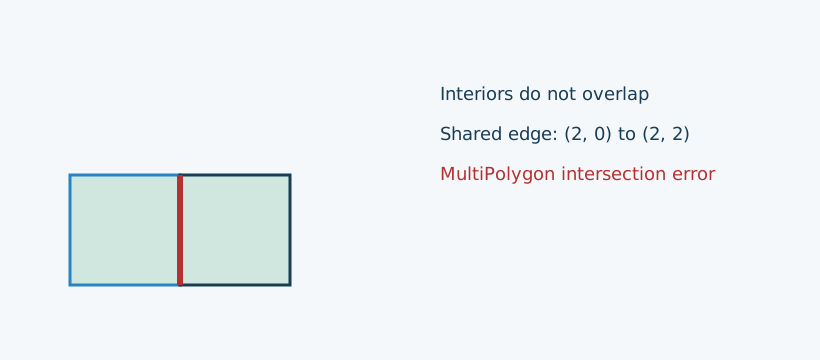
$spatialObject = new MultiPolygon([
    new Polygon([[[0, 0], [2, 0], [2, 2], [0, 2], [0, 0]]]),
    new Polygon([[[2, 0], [4, 0], [4, 2], [2, 2], [2, 0]]]),
]);
$showViolations($spatialObject);
polygons[1] | multipolygon-intersection: Polygon members 0 and 1 must have disjoint interiors and only isolated boundary contacts.
Different supporting planes
Each member must be planar, but the whole MultiPolygon need not share one plane. These squares occupy Z = 0 and Z = 1. Their XY footprints coincide, yet their XYZ surfaces do not intersect.
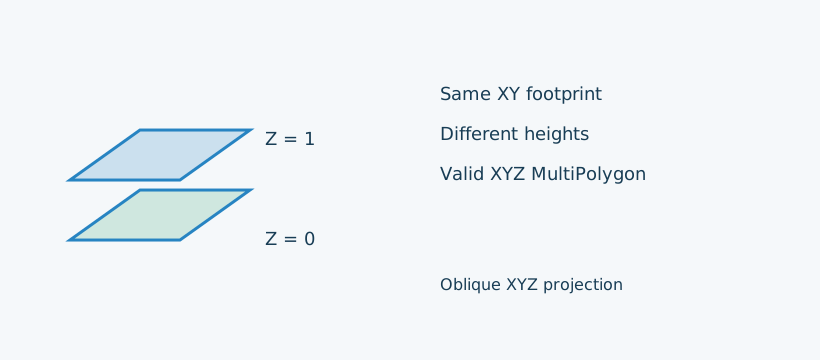
$spatialObject = new MultiPolygonZ([
    new PolygonZ([[[0, 0, 0], [2, 0, 0], [2, 2, 0], [0, 2, 0], [0, 0, 0]]]),
    new PolygonZ([[[0, 0, 1], [2, 0, 1], [2, 2, 1], [0, 2, 1], [0, 0, 1]]]),
]);
$showViolations($spatialObject); // No violations.
Checks account for filled areas after subtracting holes: a member entirely inside another member's hole, without contact, is valid.
In different XYZ planes, isolated boundary/interior contacts with disjoint interiors are allowed by this library's profile;
contact segments and intersecting interiors are rejected. XY/XYM use XY, XYZ/XYZM use XYZ, and M is ignored spatially.
Invalid members retain nested paths such as polygons[1].rings[0].points[2] and are excluded from dependent pair checks;
other valid pairs are still checked. One aggregate diagnostic is emitted per interacting pair.
An empty list or valid EMPTY members is allowed. Non-empty Geography interactions report multipolygon-unavailable at polygons[second]
with Geography MultiPolygon interactions are not implemented yet. and default warning payload ['severity' => 'warning'].
Polyhedral surface checks
A PolyhedralSurface joins Polygon or Triangle patches into one surface in XYZ or XYZM.
Unlike MultiPolygon members, neighbouring patches may share edges, and those edges connect the surface.
The polyhedral-surface rules
distinguish ordinary PolyhedralSurface validity, selected by Spatial, from explicit ClosedPolyhedralSurface validation.
Every patch receives full validation, retaining paths such as patches[0].rings[0].points[2].
A valid open surface
A valid non-empty PolyhedralSurface has valid non-EMPTY patches connected through edges, consistent shared-edge directions, no forbidden face intersections or branching, and a connected local face fan at every vertex. It may have open boundary edges. Two triangular panels meet along AB, like an open book. They traverse the shared edge in opposite directions. This is a valid PolyhedralSurface, but it does not enclose a volume and therefore fails explicit closure. The drawing uses an oblique XYZ projection.
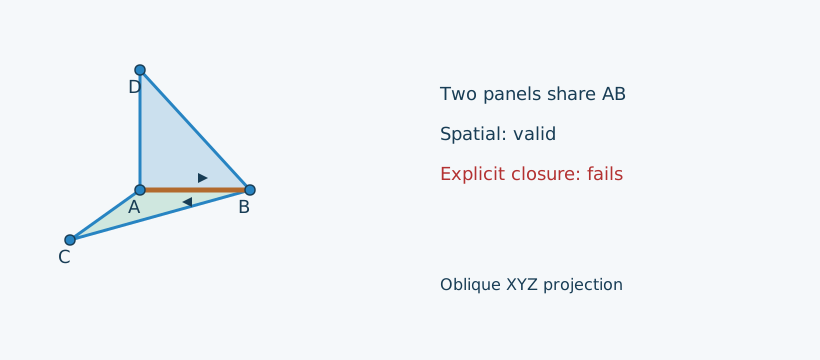
$a = [0, 0, 0];
$b = [2, 0, 0];
$c = [0, 2, 0];
$d = [0, 0, 2];
$base = new PolygonZ([[$a, $c, $b, $a]]);
$wall = new PolygonZ([[$a, $b, $d, $a]]);
$spatialObject = new PolyhedralSurface([$base, $wall]);
$showViolations($spatialObject); // No violations.
$showViolations($spatialObject, new SpatialAssert\ClosedPolyhedralSurface());
[root] | closedpolyhedralsurface-invalid: A closed PolyhedralSurface requires a non-empty envelope enclosing a volume.
The next invalid examples use a demonstration object that exposes supplied patches after construction. This lets the validator inspect malformed surface data without the standard constructor rejecting it first.
$surfaceCandidate = static function (array $patches): PolyhedralSurface {
    $surface = new class extends PolyhedralSurface {
        public array $candidatePatches = [];

        public function getPatches(): array
        {
            return $this->candidatePatches;
        }
    };
    $surface->candidatePatches = $patches;

    return $surface;
};
Opposite directions on shared edges
Reverse the wall from the open-book example and both patches now traverse AB from B to A. The surface fails the shared-edge orientation rule. This is an error, distinct from a Polygon hole's orientation warning.
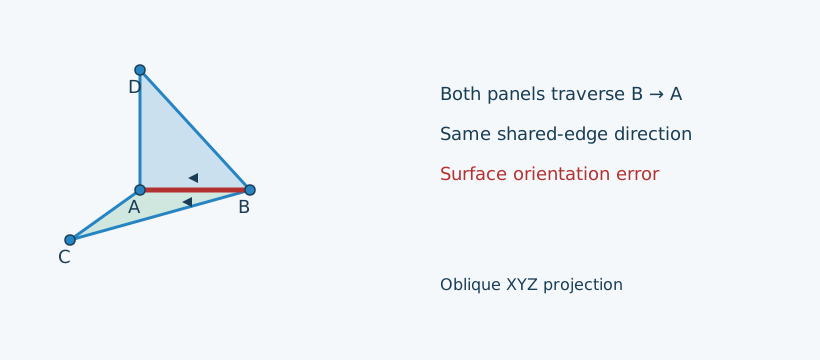
$reversedWall = new PolygonZ([[$a, $d, $b, $a]]);
$spatialObject = $surfaceCandidate([$base, $reversedWall]);
$showViolations($spatialObject);
[root] | polyhedralsurface-orientation: Shared patch boundaries must have opposite directions.
Patches must connect through edges
Two separate triangular panels do not form one connected PolyhedralSurface. Touching at a vertex alone is also insufficient: patch connectivity requires shared boundary segments.
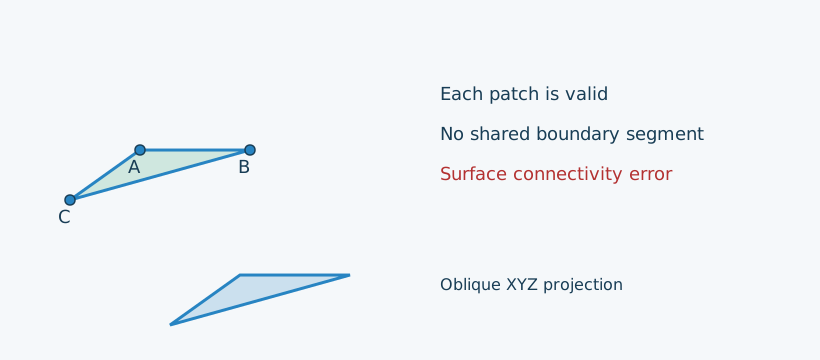
$remote = new PolygonZ([[[5, 5, 0], [7, 5, 0], [5, 7, 0], [5, 5, 0]]]);
$spatialObject = $surfaceCandidate([$base, $remote]);
$showViolations($spatialObject);
[root] | polyhedralsurface-connected: Patches must form an edge-connected surface.
No EMPTY patches
An EMPTY Polygon is valid on its own, but cannot contribute a patch to a non-empty surface. The EMPTY patch below is a schematic list entry, with no spatial position.
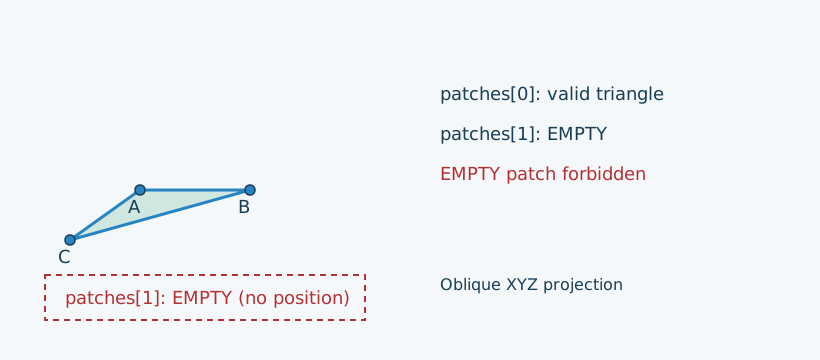
$spatialObject = $surfaceCandidate([$base, new PolygonZ([])]);
$showViolations($spatialObject);
patches[1] | polyhedralsurface-empty-patch: A non-empty PolyhedralSurface cannot contain an EMPTY patch.
A closed envelope with volume
Adding two triangular panels to the open book forms a tetrahedron. Each edge belongs to two patches with opposite directions, and the envelope encloses nonzero volume. Both ordinary validity and explicit closure pass.
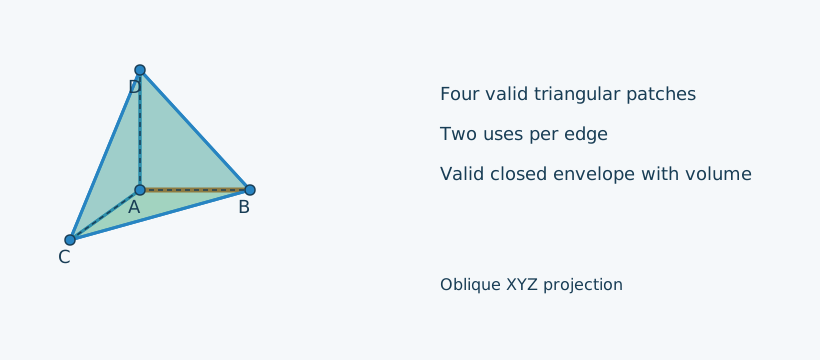
$spatialObject = new PolyhedralSurface([
    $base,
    $wall,
    new PolygonZ([[$a, $d, $c, $a]]),
    new PolygonZ([[$b, $c, $d, $b]]),
]);
$showViolations($spatialObject); // No violations.
$showViolations($spatialObject, new SpatialAssert\ClosedPolyhedralSurface()); // No violations.
Other surface diagnostics and scope
Shared segments are subdivided at supplied collinear endpoints before incidence, orientation and connectivity are checked. At each vertex, incident faces must form one connected local fan; branching or pinched configurations fail. Patch interiors must not intersect other patches. Holes are taken into account in these checks and in the enclosed-volume calculation.
| Code | Default message | Path |
|---|---|---|
polyhedralsurface-dimension | A PolyhedralSurface requires Z coordinates. | Surface |
polyhedralsurface-incidence | A boundary segment must have at most two incident patches. | Surface |
polyhedralsurface-intersection | Patch interiors must not intersect other patches. | Surface |
polyhedralsurface-manifold | Each surface vertex must have one connected local face fan. | Surface |
A memberless XYZ/XYZM surface is valid EMPTY under ordinary validation, but fails explicit closure.
Closed validity additionally requires every boundary segment to have two uses and a nonzero enclosed-volume sum.
Globally reversing all patch directions preserves the result. No patches are repaired, joined, moved or reoriented by validation.
Non-empty Geography retains available component checks and reports polyhedralsurface-unavailable with
Geography PolyhedralSurface topology is not implemented yet. and default warning payload ['severity' => 'warning'].
M must remain finite but is ignored spatially; an XYZ full surface is evaluated using its actual three-dimensional patch geometry.
Unavailable geometry types
Dispatch support does not establish complete geometric validity. The following dispatched cases are placeholders:
BRepSolid, Circle, Clothoid, CompoundSurface, Curve, CurvePolygon,
EllipticalCurve, GeodesicString, Geometry, MultiCurve, MultiSurface, NURBSCurve, Solid, SpiralCurve, Surface and TIN.
Their admissible objects, including EMPTY, produce <Type> validation is not implemented yet. with default warning payload.
Several are dispatch placeholders without a concrete model type; they do not advertise constructible or geometrically validated objects.
Available structural and Point checks run for Geometry and Geography; Cartesian topology never substitutes for unavailable geodetic calculations. Unavailable checks produce warnings, as explained in diagnostics. The implemented profile does not claim general SQL/MM conformity. See ISO/IEC 13249-3 and the SQL/MM reference for context.